

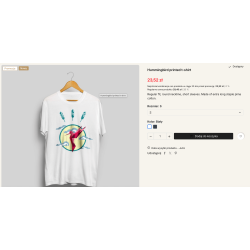


The module allows you to display messages related to order fulfillment depending on the date and time, e.g., "shipping today" or "place your order by 4 p.m. and receive your product tomorrow." A message about shipping or order fulfillment is a great way to speed up the customer's purchasing decision. Standard module installation method. Use the "add new module" option in the store backend in the modules tab. The module is compatible with PS 1.5 - 1.7x 8.x, multishop mode, and multiple languages.
Read more navigate_next
19.08 tax excl.

Full compatibility with PS 9.x
 Updates
Updates for 2 years from the date of purchase.
 Payments
Blik, Cards, PayPal, Transfer to the account. Implemented by: Imoje, FirstData, PayPal.
 Demo
Demo
Test before buying. Write to us for a temporary license for the module. Required Ioncube.
The module allows you to display dynamic information about the shipping date and order processing on the product card. The message may change depending on the day of the week and the time, so that the customer receives up-to-date information about when the product can be shipped.
The module allows you to prepare separate messages for individual days of the week. You can specify both shipment information on a given day and a message informing you about shipment on the next business day.
Thanks to this, the customer receives clear information about the expected shipping date before adding the product to the cart. This can reduce the number of questions directed to store staff and increase trust in the seller.
The store does not always have to use the server time corresponding to the actual time zone of the store. The module has a server time correction function, which allows you to adjust the displayed messages without having to change the server configuration.
The correction may include:
Values can be both positive and negative. This allows you to precisely adjust the operation of messages to the actual working hours of the store.
The module also has a holiday mode, which allows you to inform customers about a temporary break in the execution of orders. It can be used during holidays, holidays, inventory or other periods when the shipment of products is suspended.
After the holiday mode is activated, the standard shipping messages are replaced with the break information. Just specify the date range in which the message should be active.
The module allows to exclude selected product categories from the display of messages. Thanks to this, you can decide for which products the shipping date information should be presented and for which it should be omitted.
The content of the messages can be adapted to the specifics of your store. You can inform, among other things, about same-day shipping, next business day shipment or other delivery times.
The appearance of the messages is flexible and can be adapted to the store template. For stores using Bootstrap, it is possible to use ready-made alert elements.
The module uses the PrestaShop hook system, so that the message can be placed in the selected place of the product card. The attachment change is done from the standard module management panel, without the need to modify the template files.
The module is designed for PrestaShop stores that want to present product shipping date in a readable way and automatically adjust messages to the day and time. It will work especially well in stores where orders are sent only on specific days or hours.
Inform customers of the shipping date exactly when it is relevant. Automatic messages on the product card help reduce shopping uncertainty and provide customers with clear information about order completion.

You might also like
Your review appreciation cannot be sent
Report comment
Report sent
Your report cannot be sent
Write your review
Review sent
Your review cannot be sent
The module allows you to display messages related to order fulfillment depending on the date and time, e.g., "shipping today" or "place your order by 4 p.m. and receive your product tomorrow." A message about shipping or order fulfillment is a great way to speed up the customer's purchasing decision. Standard module installation method. Use the "add new module" option in the store backend in the modules tab. The module is compatible with PS 1.5 - 1.7x 8.x, multishop mode, and multiple languages.